Sound Attribute Viewer And Tweaker
Info
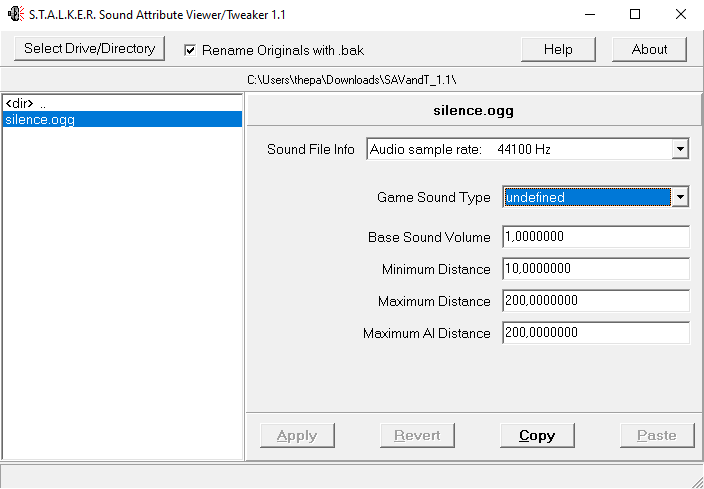
Sound Attribute Viewer And Tweaker v1.1.7 | |
| License | Not specified |
|---|---|
| Website | |
| Developers |  |
About
Utility designed to simplify working with X-Ray Engine sound files in *.ogg format.
Features
- Easy viewing of comments in files, and other information
- Quick editing of comments, with automatic CRC-32 checksum generation
- Automatic insertion of comment structure into standard *.ogg files (eliminates Missing ogg-comment and Invalid ogg-comment version errors)
- Small executable file that does not require installation
- No hex editor, X-Ray SDK or checksum fixing required
- Help file included, accessible from the utility
Functionality
Buttons
| Button | Description |
|---|---|
| Select Drive/Directory | Selects the path to the directive with the sounds (If you press Ctrl and click on the button the list will reload) |
| Help | Output Help Information |
| About | About |
Checkboxes
| Checkboxes | Description |
|---|---|
| Rename Originals with *.bak | Make backup when saving |
Parameters
| Parameters | Description | Possible parameters |
| Header (audio file name) | When clicked, it opens the media player installed on your computer and plays only the original *.ogg sound (without affecting the settings) | - |
| Sound File Info | Displays some detailed information about the sound itself. These characteristics are shown for information and cannot be changed | - |
| Game Sound Type | Determines how the sound will be perceived by NPCs and mutants in the game | undefined
|
| Base Sound Volume | Default sound volume in the game at the sound source location | Range is 0.0 - 2.0 |
| Minimum Distance | indicates the distance in meters from the sound source at which it can still be heard at 100% volume | |
| Maximum Distance | Distance in meters from the sound source at which you can no longer hear the sound | |
| Maximum AI Distance | Distance from the sound source (in meters) at which NPCs can no longer hear the sound |