THM Editor
Info
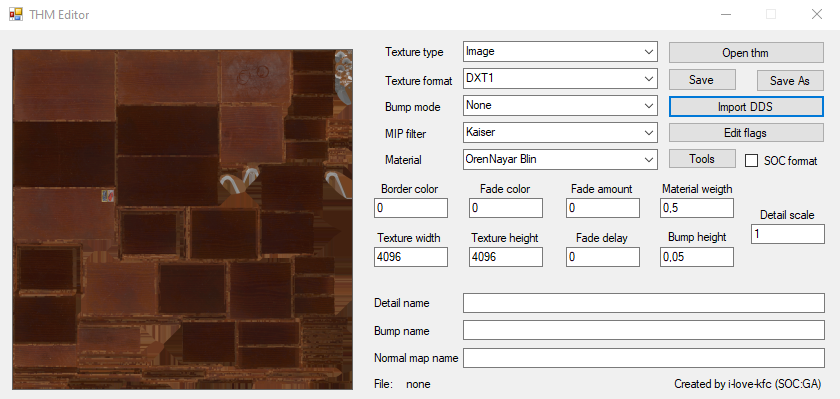
THM Editor v1.5 | |
| License | Not specified |
|---|---|
| Repository | |
| Developers |  |
About
Utility for editing *.thm files without the need to use the SDK
Features
- Changing any available information stored in a *.thm file
- Ability to fix incorrectly displayed textures when transferring *.thm files from CS/COP
- Ability to create a file from scratch (without loading another *.thm file)
Functionality
Buttons
- Open thm - Opens a *.thm file
- Save - Save file
- Save As - Save as
- Import DDS - Imports .dds texture
Edit flags
| Checkbox | Description | Extra |
|---|---|---|
| Generate Mip Maps | Enables MIP-map generation | |
| Has Alpha | Takes into account map alpha channel | |
| Binary Alpha | ||
| Alpha Border | ||
| Color Border | In this mode, a color arbitrarily specified by the user is used for the area outside the texture coordinate range | Decimal Color? |
| Fade To Color | Fade to choosed color | Decimal Color? |
| Fade To Alpha | ||
| Dither Color | Enables Dither Coloring | |
| Dither Each MIP Level | Enables Dither Coloring on each MIP level | |
| Diffuse Detail | ||
| Implicit Lighted | ||
| Detail Bump | ||
| Grey Scale (S.T.A.L.K.E.R. builds) |
Texture type
| Field | Description |
|---|---|
| Image | 2D texture |
| Cube Map | Is a method of environment mapping that uses the six faces of a cube as the map shape |
| Bump Map | Bump Map |
| Normal Map | Normal Map |
| Terrain | Terrain Map |
Texture compression formats
| Field | Description |
|---|---|
| DXT1 | Compression without alpha channel support |
| ADXT1 | Compression with alpha channel support |
| DXT5 | Compression with alpha channel support |
| 4444 | aka D3DFMT_A4R4G4B4 Color and alpha texture format, 4 bit per channel |
| 1555 | aka D3DFMT_A1R5G5B5A pixel occupies 16 bits (2 bytes) and contains color and transparency information in the following format: 5 bits for the red channel (R) 5 bits for the green channel (G) 5 bits for the blue channel (B) 1 bit for the alpha channel (A) |
| 565 | aka D3DFMT_R5G6B5 Each pixel occupies 16 bits (or 2 bytes) and contains color information in the following distribution: 5 bits for the red channel (R) 6 bits for the green channel (G) 5 bits for the blue channel (B) |
| RGB | Compression without alpha channel support |
| RGBA | Compression with alpha channel support |
| NVHS | NVIDIA High Compression (NVidia Texture Format (GEForce 3)) |
| NVHU | NVIDIA High-Quality Texture Compression (NVidia Texture Format) |
| A8 | 8-bit alpha only DirectX Format |
| L8 | 8-bit luminance only DirectX Format |
| A8L8 | 16-bit using 8 bits each for alpha and luminance DirectX Format |
Bump Mode
| Field | Description |
|---|---|
| Autogen (S.T.A.L.K.E.R. Builds) | |
| None | None |
| Use | Use Bump mapping method |
| Use Parallax | Use Parallax mapping method |
MIP Filter
| Field | Description | Preview |
|---|---|---|
| Box | Simplest MIP-map generation algorithm. However, the box filter has a number of limitations that can be quite noticeable with certain textures. For example, if a texture contains very narrow features (e.g., lines), then aliasing artifacts may be very pronounced | |
| Cubic | Generation with weighted sum of eight pixels. The advantage of the cubic filter over the box is that it can have negative side lobes (weights) which help maintain sharpness while reducing the image. This can help reduce some of the blurring effect of filtering with mipmaps | |
| Point | (aka Nearest-neighbor interpolation) Uses only one pixel from the mipmap This is a simple and fast texture filtering method that works well in some cases, but can create visual artifacts and reduce image quality in more complex scenes. | |
| Triangle | ||
| Quadratic | This method offers a balance between quality and performance It uses an interpolation method that is based on quadratic equations. Instead of just selecting one pixel (as in Point), this method considers three pixels - one from the selected mipmap level and the two closest to it - to greatly improve the smoothness of the transition of color values. | |
| Advanced | ||
| Catrom | ||
| Mitchell | ||
| Gaussian | ||
| Sinc | ||
| Bessel | ||
| Hanning | ||
| Hamming | ||
| Blackman | ||
| Kaiser | Increase readability of textures by increasing sharpness and contrast |
Material
info
Different shading algorithms
| Field | Description |
|---|---|
| OrenNayar Blin | Oren-Nayar shading is a lighting model used in computer graphics to render matte (rough) surfaces with respect to their micro geometry. Blin shading uses a combination of diffuse and specular light reflection to achieve a more realistic image of shiny objects. |
| Blin Phong | Blin shading uses a combination of diffuse and specular light reflection to achieve a more realistic image of shiny objects. Phong shading model can achieve good visual results, making objects appear more three-dimensional and realistic, but at the same time it cannot always accurately reproduce lighting effects on more complex or uneven surfaces. |
| Phong Metal | Phong shading model can achieve good visual results, making objects appear more three-dimensional and realistic, but at the same time it cannot always accurately reproduce lighting effects on more complex or uneven surfaces. Metal shading is focuses on the realization of materials imitating metallic surfaces. |
| Metal OrenNayar | Metal shading is focuses on the realization of materials imitating metallic surfaces. Oren-Nayar shading is a lighting model used in computer graphics to render matte (rough) surfaces with respect to their micro geometry. |
Tools
| Button | Description |
|---|---|
| Generate thms by .dds | |
| Fix invalid chunks in thms | |
| Validate thms with .dds | |
| Convert thms format (SOC/COP) | - |
Checkboxes
- SOC format - SoC format of *.thm
Fields
| Field | Description |
|---|---|
| Border Color | |
| Fade Color | |
| Fade Amount | |
| Material Weight | Shading model weight (0.0 - 1.0) |
| Detail Scale | Detail Map Scale |
| Texture Width | Texture Width |
| Texture Height | Texture Height |
| Fade Delay | |
| Bump Height | Bump Map Height |
| Detail name | Path to Detail Map |
| Bump name | Path to Bump Map |
| Normal Map name | Path to Normal Map |