Change Userdata Operator
About
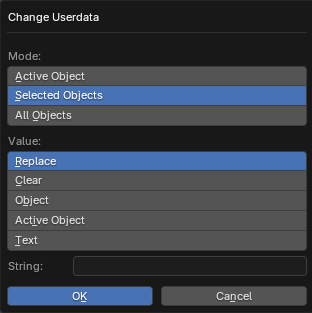
Changes the value of the User Data parameter from the X-Ray Engine: Object panel to objects
Mode
Active Object- Active objectSelected Objects- Selected objectsAll Objects- All objects from blend-file
Value
Replace- Replaces the parameter value with the text from the Value parameter belowClear- Deletes the parameter valueObject- Sets the value of the parameter to the same as the object selected in the Object parameter belowActive Object- sets the value of the parameter to the same as the active object. If this mode is selected, the name of the active object will be displayed belowText- sets the value of the parameter to the same as the content of the text data block, which is specified in the Text parameter below
Object
Specifies the object from which to take the parameter value. Available in Object mode
Text
Specifies the text block of data whose contents will be used as the value for the parameter. Available in Text mode